2026/06/26
開始使用 Next.js App Router 之後,最常遇到的問題之一就是:
這個元件到底要不要加 'use client'?
一開始很容易看到錯誤就直接加。
元件不能用 useState,加。
不能用 useEffect,加。
不能用 click event,加。
第三方套件報錯,也加。
最後整個頁面越來越多 Client Component,原本 App Router 想帶來的 Server Component 優勢,可能就慢慢消失了。
我自己現在會把這件事想成:
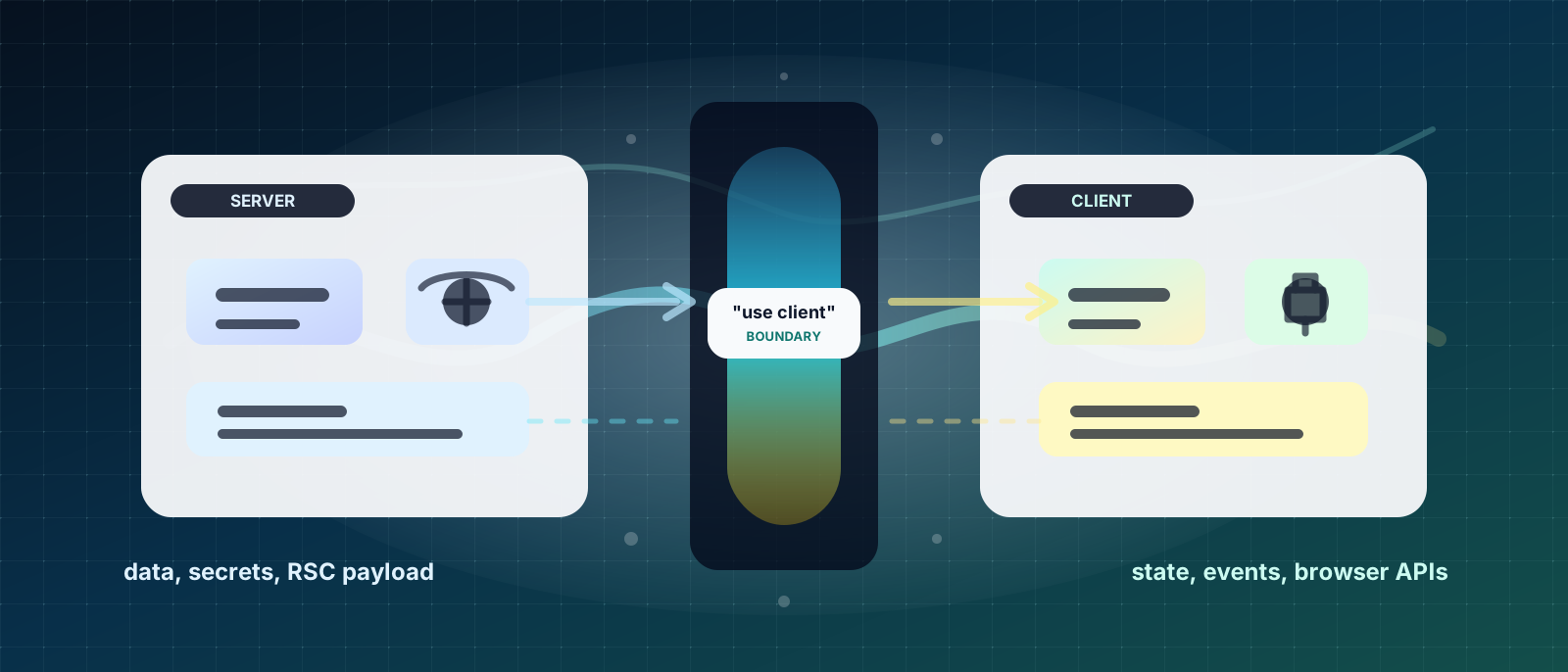
預設先 Server,需要互動再 Client。
這句話很簡單,但實務上難的是判斷「什麼叫需要互動」。
Server Component 是在伺服器端執行的元件。
它適合處理:
例如文章詳情頁:
export default async function PostPage({
  params,
}: {
  params: Promise<{ slug: string }>;
}) {
  const { slug } = await params;

  const post = await getPostBySlug(slug);

  return (
    <main>
      <h1>{post.title}</h1>
      <article>{post.content}</article>
    </main>
  );
}
這種頁面本身不一定需要互動。
它只是根據 slug 取得文章資料,然後渲染內容。
這時候讓它保持 Server Component 會比較合理。
Client Component 是會送到瀏覽器端執行的元件。
只要元件需要使用 React client-side feature,就要加 'use client'。
例如:
'use client';

import { useState } from 'react';

export function Counter() {
  const [count, setCount] = useState(0);

  return (
    <button onClick={() => setCount((prev) => prev + 1)}>
      Count: {count}
    </button>
  );
}
只要有這些需求,通常就是 Client Component:
| 需求 | 原因 |
|---|---|
useState | 需要瀏覽器端狀態 |
useEffect | 需要在瀏覽器端執行副作用 |
onClick | 需要使用者互動 |
window / document | 只能在瀏覽器端使用 |
localStorage | 瀏覽器 API |
| Zustand | client state |
| React Query | client-side cache |
| 表單即時互動 | 需要瀏覽器狀態 |
這是最常見的情況。
例如:
'use client';

export default function PostPage() {
  return (
    <main>
      <PostHeader />
      <PostContent />
      <LikeButton />
    </main>
  );
}
這樣不是不能跑,但問題是整個 page 都變成 Client Component。
如果 PostHeader、PostContent 其實只是靜態內容,它們也會被一起拉到 client side。
比較好的切法是:
export default async function PostPage() {
  const post = await getPost();

  return (
    <main>
      <PostHeader title={post.title} />
      <PostContent content={post.content} />
      <LikeButton postId={post.id} />
    </main>
  );
}
然後只有真的需要互動的部分加 'use client':
'use client';

export function LikeButton({ postId }: { postId: string }) {
  return <button onClick={() => console.log(postId)}>Like</button>;
}
這樣頁面主體仍然是 Server Component。
只有 LikeButton 是 Client Component。
很多時候,我們只是需要某個小按鈕有互動。
但如果沒有切好,就會讓整個區塊變成 Client Component。
例如:
'use client';

export function PostCard({ post }: { post: Post }) {
  return (
    <article>
      <h2>{post.title}</h2>
      <p>{post.excerpt}</p>
      <button onClick={() => alert('saved')}>收藏</button>
    </article>
  );
}
這樣 PostCard 會整個變 Client。
如果文章卡片內容很多,而且大部分都是靜態顯示,可以改成:
export function PostCard({ post }: { post: Post }) {
  return (
    <article>
      <h2>{post.title}</h2>
      <p>{post.excerpt}</p>
      <SaveButton postId={post.id} />
    </article>
  );
}'use client';
export function SaveButton({ postId }: { postId: string }) {
return (
<button onClick={() => alert(`saved: ${postId}`)}>
收藏
</button>
);
}這樣 Client Component 的範圍就比較小。
以前寫 React SPA 很習慣這樣:
'use client';

import { useEffect, useState } from 'react';

export default function PostsPage() {
  const [posts, setPosts] = useState<Post[]>([]);

  useEffect(() => {
    fetch('/api/posts')
      .then((res) => res.json())
      .then(setPosts);
  }, []);

  return (
    <main>
      {posts.map((post) => (
        <PostCard key={post.id} post={post} />
      ))}
    </main>
  );
}
這在傳統 React 裡很常見。
但在 App Router 裡,如果這些資料是頁面初始就需要的內容,通常可以直接在 Server Component 取得:
export default async function PostsPage() {
  const posts = await getPosts();

  return (
    <main>
      {posts.map((post) => (
        <PostCard key={post.id} post={post} />
      ))}
    </main>
  );
}
這樣有幾個好處:
如果是部落格文章、商品詳情、行銷頁內容,通常都很適合放在 Server Component。
Client Component 會送到瀏覽器。
所以不該把敏感邏輯放進 Client Component。
例如:
'use client';

const apiKey = process.env.SECRET_API_KEY;
這種概念上就不對。
敏感資料、server-only token、資料庫查詢,都應該放在 server 端。
比較好的方式是:
export default async function DashboardPage() {
  const data = await getDashboardData();

  return <DashboardView data={data} />;
}
如果畫面需要互動,再把安全處理過的資料傳給 Client Component。
'use client';

export function DashboardView({ data }: { data: DashboardData }) {
  return <div>{data.title}</div>;
}
重點是:
Client Component 只拿它需要顯示或互動的資料,不要拿敏感資訊。
Server Component 可以 import Client Component。
但傳給 Client Component 的 props 需要是可以序列化的資料。
通常可以傳:
stringnumberbooleannull不適合傳:
例如這樣就不適合:
<ClientComponent onClick={handleClick} />因為 Server Component 裡的 function 不能直接傳到 Client Component。
比較好的方式是讓 Client Component 自己處理互動:
<ClientComponent postId={post.id} />'use client';
export function ClientComponent({ postId }: { postId: string }) {
function handleClick() {
console.log(postId);
}
return <button onClick={handleClick}>Click</button>;
}Server 負責給資料。
Client 負責互動。
很多 UI library 的元件本身需要 client-side 行為。
例如:
這些元件通常會用到 state、effect、DOM event,所以多半需要 Client Component。
但不代表整個頁面都要變 Client。
可以把 UI 套件集中包在小型 Client Component 裡。
例如:
export default async function SettingsPage() {
  const profile = await getProfile();

  return (
    <main>
      <h1>設定</h1>
      <ProfileForm profile={profile} />
    </main>
  );
}'use client';
export function ProfileForm({ profile }: { profile: Profile }) {
return (
<form>
<input defaultValue={profile.name} />
<button type="submit">儲存</button>
</form>
);
}這樣頁面的資料取得仍然在 Server。
表單互動才放 Client。
實務上我會用幾個問題判斷。
如果有 click、input、select、drag、keyboard event,通常是 Client Component。
例如:
| 元件 | 建議 |
|---|---|
| LikeButton | Client |
| SearchInput | Client |
| LoginForm | Client |
| ThemeToggle | Client |
| MobileDrawer | Client |
| ArticleContent | Server |
| Breadcrumb | Server |
| Footer | Server |
如果需要這些 hooks,就要是 Client Component:
useStateuseEffectuseRefuseReduceruseMemouseCallback但這裡要注意,不是看到要用 hooks 就直接把整頁改成 Client。
更好的做法是把需要 hooks 的部分拆出去。
如果資料是頁面一進來就要看到的內容,通常適合在 Server Component 取得。
例如:
| 資料 | 建議 |
|---|---|
| 文章詳情 | Server |
| 商品詳情 | Server |
| 分類列表 | Server |
| SEO metadata | Server |
| 登入後使用者基本資料 | 視情況 |
| 即時搜尋結果 | Client 或 URL + Server |
| 無限滾動資料 | Client / Hybrid |
如果邏輯涉及:
就不要放在 Client Component。
這些應該放在:
Client Component 只負責顯示結果或觸發動作。
如果狀態只跟瀏覽器互動有關,通常就是 Client。
例如:
| 狀態 | 建議 |
|---|---|
| modal open | Client |
| tab active | Client |
| drawer open | Client |
| input value | Client |
| localStorage theme | Client |
| selected row | Client |
| URL search params | 視需求 |
| 文章內容 | Server |
以部落格文章頁來說,我會這樣切:
PostPage.server ├── PostHeader.server ├── PostContent.server ├── RelatedPosts.server ├── ShareButton.client └── FavoriteButton.client文章內容、標題、相關文章都可以是 Server Component。
分享按鈕、收藏按鈕需要互動,所以拆成 Client Component。
範例:
export default async function PostPage({
  params,
}: {
  params: Promise<{ slug: string }>;
}) {
  const { slug } = await params;
  const post = await getPostBySlug(slug);

  return (
    <main>
      <PostHeader title={post.title} publishedAt={post.publishedAt} />
      <PostContent content={post.content} />

      <div>
        <ShareButton title={post.title} />
        <FavoriteButton postId={post.id} />
      </div>
    </main>
  );
}
這樣整個頁面不會因為兩個按鈕,就全部變成 Client Component。
搜尋頁比較容易卡住。
因為它同時有:
我會先看需求。
如果搜尋結果需要 SEO,或希望網址可以分享:
/posts?keyword=react&category=frontend&page=1那我會讓 search params 驅動 Server Component 重新取得資料。
export default async function PostsPage({
  searchParams,
}: {
  searchParams: Promise<{
    keyword?: string;
    category?: string;
    page?: string;
  }>;
}) {
  const params = await searchParams;

  const posts = await getPosts({
    keyword: params.keyword,
    category: params.category,
    page: Number(params.page ?? 1),
  });

  return (
    <main>
      <PostSearchBar />
      <PostList posts={posts} />
    </main>
  );
}
PostSearchBar 可以是 Client Component,負責更新 URL。
'use client';

import { useRouter, useSearchParams } from 'next/navigation';

export function PostSearchBar() {
  const router = useRouter();
  const searchParams = useSearchParams();

  function handleSearch(keyword: string) {
    const params = new URLSearchParams(searchParams);

    if (keyword) {
      params.set('keyword', keyword);
    } else {
      params.delete('keyword');
    }

    router.push(`/posts?${params.toString()}`);
  }

  return (
    <input
      placeholder="搜尋文章"
      onChange={(event) => handleSearch(event.target.value)}
    />
  );
}
這種切法的概念是:
Client 更新 URL ↓Server 根據 searchParams 取得資料 ↓畫面重新渲染這樣搜尋條件可以被網址記住,也比較適合列表頁。
React Query 是 Client Side 的資料管理工具。
所以只要使用 useQuery,那個元件就要是 Client Component。
例如:
'use client';

import { useQuery } from '@tanstack/react-query';

export function NotificationList() {
  const { data, isLoading } = useQuery({
    queryKey: ['notifications'],
    queryFn: fetchNotifications,
  });

  if (isLoading) return <p>Loading...</p>;

  return (
    <ul>
      {data?.map((item) => (
        <li key={item.id}>{item.title}</li>
      ))}
    </ul>
  );
}
那什麼時候適合用 React Query?
我通常會放在這些情境:
| 情境 | 適合 |
|---|---|
| 使用者登入後資料 | 可以 |
| 通知列表 | 可以 |
| 收藏狀態 | 可以 |
| dashboard 小卡 | 可以 |
| 需要 refetch 的資料 | 可以 |
| 初始 SEO 內容 | 不一定 |
| 文章詳情頁主內容 | 通常不用 |
如果資料跟 SEO 或初始內容強相關,我會優先 Server Component。
如果資料需要頻繁互動、重新整理、mutation、快取,就可以考慮 React Query。
Zustand 也是 Client State,所以使用 Zustand 的元件一定是 Client Component。
例如:
'use client';

import { useUiStore } from '@/stores/useUiStore';

export function MobileMenuButton() {
  const openMenu = useUiStore((state) => state.openMenu);

  return <button onClick={openMenu}>Menu</button>;
}
Zustand 很適合放:
但我不會把 Server Component 為了使用 Zustand 直接改成 Client。
我會拆小:
Layout.server ├── Header.server ├── MobileMenuButton.client └── MobileDrawer.client| 問題 | 如果是 | 建議 |
|---|---|---|
| 需要 SEO 嗎? | 需要 | Server |
| 初始畫面就要資料嗎? | 需要 | Server |
| 需要使用者互動嗎? | 需要 | Client |
需要 useState 嗎? | 需要 | Client |
| 需要 Zustand 嗎? | 需要 | Client |
| 需要 React Query 嗎? | 需要 | Client |
| 需要讀 token / DB 嗎? | 需要 | Server |
| 只是排版或內容顯示嗎? | 是 | Server |
| 只是小按鈕互動嗎? | 是 | 拆成小 Client Component |
這通常只是讓錯誤消失,不代表架構正確。
比較好的做法是先問:
是整頁都需要 client,還是只有某個小元件需要?
例如:
這些不該放 Client。
這也很常見。
例如為了 theme、menu、auth 狀態,把整個 layout 改成 Client。
通常可以拆成 provider 或小元件,不一定要讓整個 layout client-side。
useEffect 打 APIApp Router 已經提供 Server Component 的資料取得模式。
如果是初始頁面內容,不一定要回到以前 SPA 的寫法。
我現在會用這個方向拆:
Server Component 負責資料取得、SEO、權限前置檢查、靜態內容、版面骨架 Client Component 負責互動、表單、瀏覽器 API、client state、mutation 操作更具體一點:
Page.server ├── Data Section.server ├── Content Section.server ├── SEO Content.server └── Interactive Widget.client不要為了局部互動,把整個頁面變成 Client Component。
也不要為了追求 Server Component,把所有互動都寫得很彆扭。
重點是邊界要清楚。
Next.js App Router 的 Server Component / Client Component 切分,核心不是背規則。
而是先分清楚每個元件的責任。
| 責任 | 放哪裡 |
|---|---|
| 資料取得 | Server |
| SEO 內容 | Server |
| 靜態 UI | Server |
| 權限與敏感邏輯 | Server |
| 使用者互動 | Client |
| 表單狀態 | Client |
| 瀏覽器 API | Client |
| Zustand | Client |
| React Query | Client |
我自己的原則是:
頁面預設 Server,互動局部 Client。
這樣做可以保留 App Router 的優勢,也能避免整個專案慢慢退回傳統 SPA 寫法。
Server Component 不是要取代 Client Component。
Client Component 也不是不能用。
真正重要的是,不要讓一個小互動,拖著整個頁面一起變 Client。
切得清楚,資料流會比較穩,效能比較好,後面接手的人也比較容易看懂。